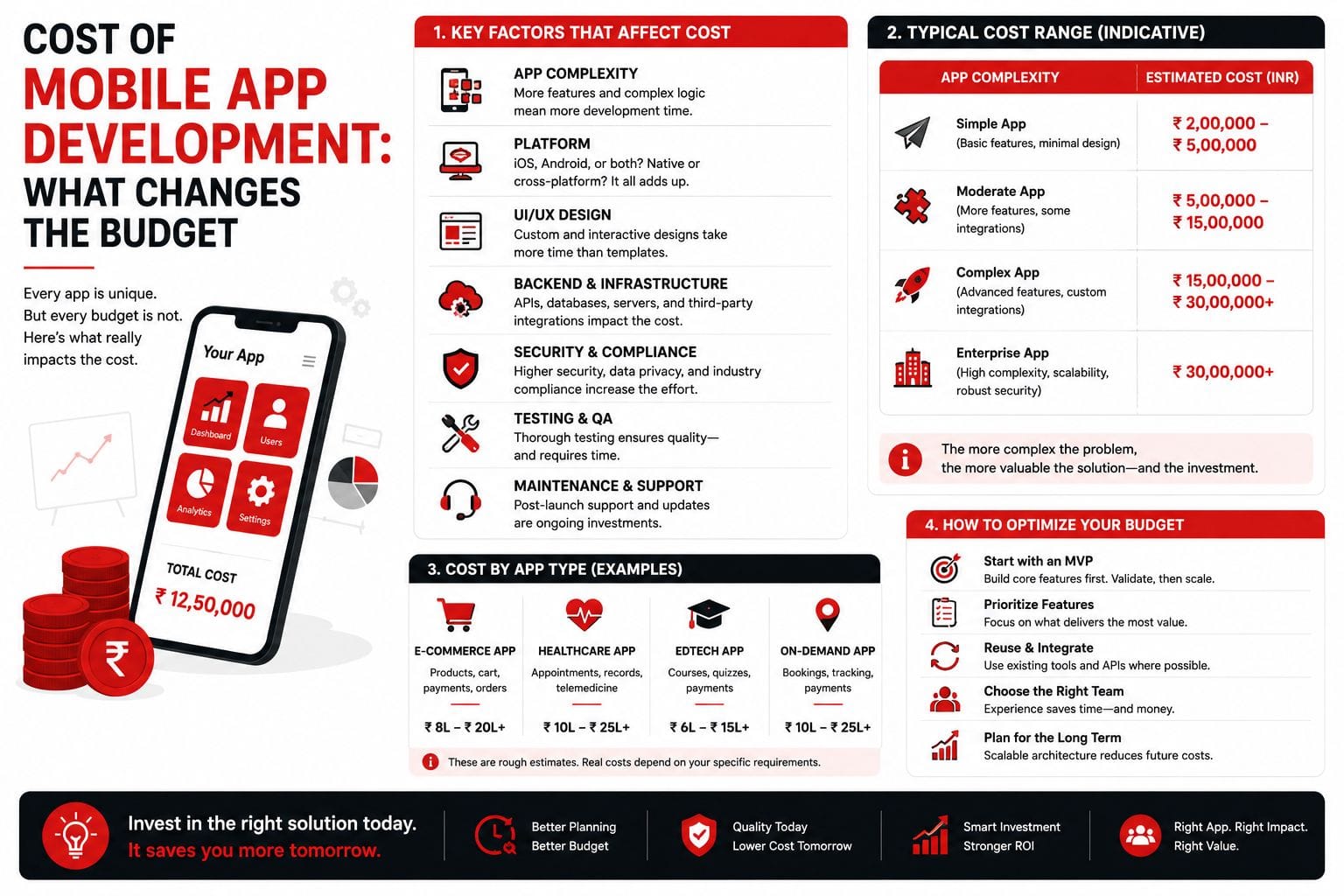
Cost of Mobile App Development: What Changes the Budget
One of the most common questions we hear is: "How much does it cost to build a mobile app?" The honest answer is that it depends — but not in the vague, unhelpful way that phrase is usually used. The cost of a mobile app is driven by a specific set of factors, and understanding those factors is the first step to budgeting realistically.
The Five Primary Cost Drivers
1. Scope and Feature Complexity
This is the biggest lever. A simple app with user login, a list view, and a detail screen might take 200–400 development hours. An app with real-time chat, payment processing, complex offline capabilities, and deep backend integration might take 1,500–3,000 hours. Every feature you add increases not just development time but also testing time and long-term maintenance burden.
2. Platform Strategy: iOS, Android, or Cross-Platform
Building separate native apps for iOS (Swift) and Android (Kotlin) gives you the best platform-specific experience but roughly doubles development effort. Cross-platform frameworks like React Native and Flutter let you share 70–85% of code across platforms, significantly reducing cost while delivering near-native performance for most use cases. The trade-off is that some platform-specific features (complex animations, AR, advanced camera use) may require native modules even in a cross-platform app.
3. UX and Design Complexity
A clean, functional design built with standard UI components costs far less than a custom-designed interface with complex animations, custom transitions, and bespoke interaction patterns. Design cost is not just about making things look good — it is about the engineering effort required to implement custom UI behavior. Every custom animation, gesture, or transition is development time that could have been spent on functionality.
4. Backend and Third-Party Integrations
Most apps are not standalone — they connect to APIs, databases, payment gateways, analytics services, push notification systems, and more. Each integration adds development and testing effort. Integrations with well-documented, modern APIs (Stripe, Firebase, Twilio) are relatively fast. Integrations with legacy systems, custom ERPs, or poorly-documented internal APIs can become the most expensive part of the project.
5. Post-Launch Support and Maintenance
The app store does not let you set it and forget it. Both iOS and Android release major OS updates annually, and your app needs to stay compatible. Server costs, bug fixes, performance monitoring, and user feedback-driven improvements are ongoing expenses. A reasonable rule of thumb is to budget 15–20% of initial development cost per year for maintenance.
Realistic Budget Ranges
While every project is unique, here are broad ranges based on app complexity:
- Simple app (3–5 screens, basic backend, standard UI, one platform): 200–400 hours. Think: a content display app, a simple booking form, or an internal tool with basic CRUD operations.
- Moderate app (8–15 screens, authentication, payments, API integrations, cross-platform): 600–1,200 hours. Think: an e-commerce app, a service booking platform, or a customer portal with user accounts and real-time data.
- Complex app (20+ screens, real-time features, complex backend, custom UX, multiple integrations): 1,500–3,000+ hours. Think: a social platform, a logistics tracking system with live maps, or a healthcare app with compliance requirements.
The Hidden Costs Most Budgets Miss
Beyond development hours, there are costs that first-time app builders often overlook:
- App store fees: Apple charges USD 99/year for the Developer Program. Google charges a one-time USD 25 fee. Both platforms take a 15–30% commission on in-app purchases and subscriptions.
- Server and infrastructure: Cloud hosting (AWS, Google Cloud, or simpler alternatives like Firebase) starts small but scales with usage. Budget at least USD 50–200/month for launch and plan for growth.
- Third-party service subscriptions: Payment gateways charge per-transaction fees. Push notification services, analytics platforms, and crash reporting tools each have their own pricing tiers.
- Testing devices: You need physical devices for testing. Emulators do not catch everything — camera behavior, push notifications, biometric authentication, and performance on older devices all need real-device testing.
- Legal and compliance: Privacy policies, terms of service, GDPR compliance, and industry-specific regulations (HIPAA, PCI-DSS) may require legal review, which adds cost before you even launch.
How to Keep Costs Under Control
Start with a tightly scoped MVP that targets one platform. Use cross-platform frameworks to reach both iOS and Android efficiently. Choose standard UI patterns over custom design. Integrate with well-documented third-party services instead of building everything from scratch. And most importantly, validate your core idea with users before investing in polish — a functional MVP with real user feedback is worth more than a beautiful app nobody asked for.
The most expensive app is not the one with the highest development cost — it is the one that launches with a bloated scope and no users.
Ready to build software that actually solves problems?
Start a Conversation