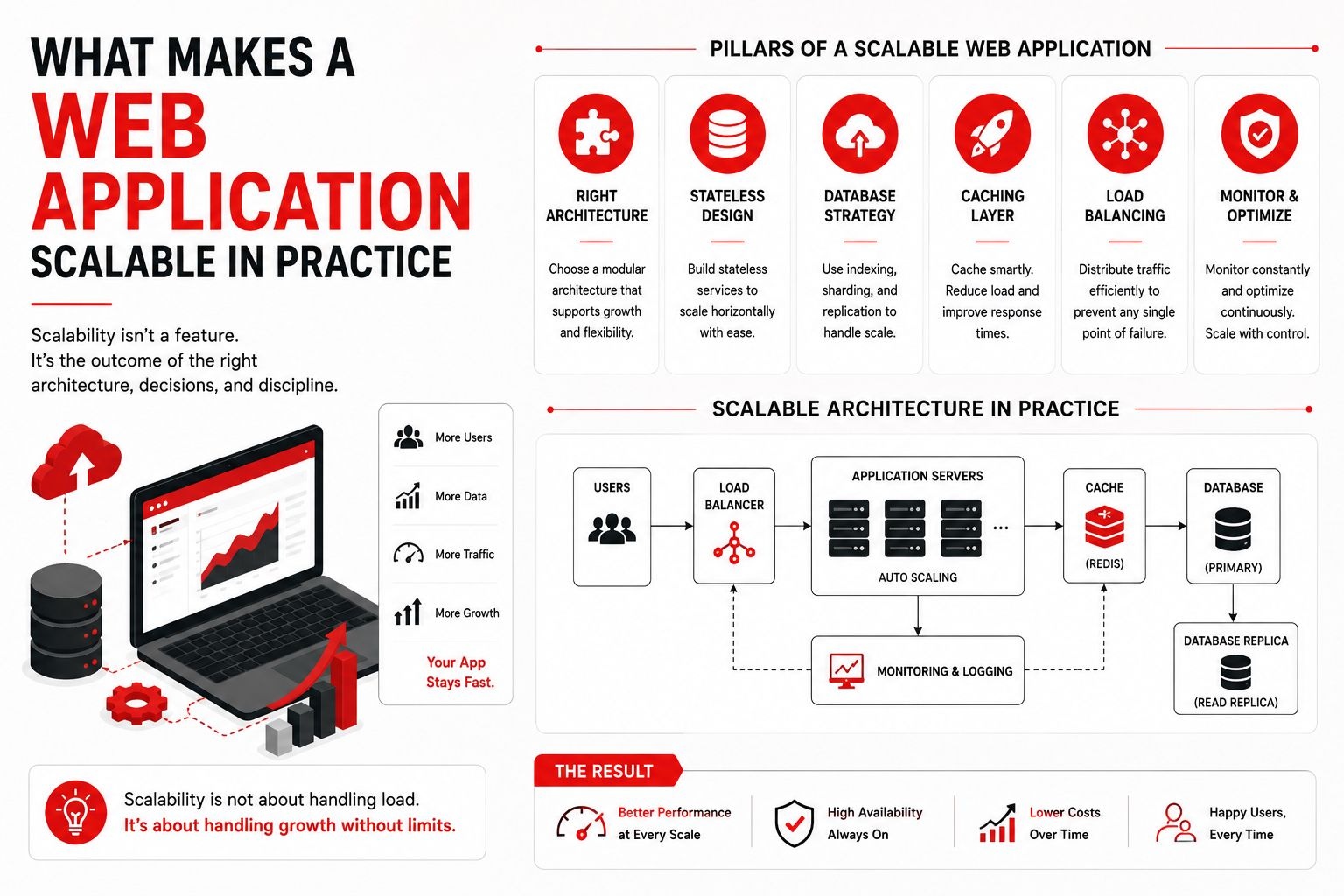
What Makes a Web Application Scalable in Practice
Scalability is one of the most misunderstood concepts in web development. Many teams equate scalability with "using microservices" or "choosing the right cloud provider." In practice, scalability is not a single technology decision — it is a set of architectural habits that, when followed consistently, allow your application to grow without collapsing under its own weight.
Scalability Is About Velocity, Not Just Traffic
Most discussions about scalability focus on handling more users. But there is a second dimension that matters just as much: how fast can your team add features without breaking things? A truly scalable web application scales in both directions — it handles more traffic, and it accommodates more features without exponential increases in complexity.
If adding a new feature requires changes across five different services, your architecture is not scalable — regardless of how many requests per second it can handle.
Frontend Architecture That Ages Well
On the frontend, scalability starts with component architecture. The patterns that keep a React or Vue application maintainable at 50 components are the same patterns that keep it sane at 500:
- Separation of concerns: Keep data fetching, business logic, and presentation in distinct layers. A component that fetches, transforms, and renders data is hard to test and harder to change.
- Consistent state management: Whether you use Redux, Zustand, or React Context, pick one approach and apply it uniformly. Mixed state management strategies create bugs that are hard to trace.
- Design system discipline: A shared component library with design tokens (colors, spacing, typography) means UI changes propagate predictably. Without it, every new page introduces slight visual inconsistencies that accumulate into a maintenance burden.
- Route-based code splitting: Lazy-load routes so users only download the JavaScript they need. This is table stakes for performance but surprisingly often overlooked.
Backend Resilience: Patterns That Actually Matter
On the backend, scalable architecture is less about the specific framework and more about how you structure data flow and failure handling:
- Database query discipline: The difference between a scalable API and an unscalable one is often visible in the database queries. N+1 queries, missing indexes, and unbounded result sets will degrade performance long before your infrastructure becomes the bottleneck.
- Asynchronous processing by default: Anything that does not need a synchronous response — email sending, report generation, image processing — should move to a job queue. This keeps your API responsive and prevents long-running operations from blocking other requests.
- Idempotency: Operations that can be safely retried without side effects are the foundation of resilient systems. If your payment processing or order creation endpoints are not idempotent, a network retry can create duplicate charges or double orders.
- Graceful degradation: When a downstream service is slow or unavailable, your application should degrade gracefully — show cached data, queue the operation for later, or present a clear message — rather than crashing or timing out silently.
The Database Is Usually the Bottleneck
In most web applications, the database becomes the scalability bottleneck long before the application servers do. A few principles help:
- Read replicas for read-heavy workloads. If your application serves far more reads than writes, offloading reads to replicas can buy you significant headroom.
- Strategic caching: Not every query needs to hit the database. Frequently accessed, slowly-changing data — configuration, reference data, popular content — should be cached at the application level or via a CDN.
- Schema design for access patterns: Design your database schema around how you query data, not just how you store it. This is especially important with NoSQL databases like DynamoDB, where access patterns drive key design.
- Connection pooling: A misconfigured connection pool is a surprisingly common cause of production incidents. Ensure your pool size is appropriate for your workload and database instance capacity.
Observability: You Cannot Scale What You Cannot See
Scalability without observability is guesswork. At a minimum, every production web application should have:
- Structured logging: JSON-formatted logs with correlation IDs so you can trace a request across services.
- Metrics and dashboards: Request latency, error rates, database query times, and queue depths should be visible at a glance.
- Alerting on symptoms, not causes: Alert on "users are experiencing high latency" rather than "CPU usage is above 80%." The first tells you there is a user impact; the second may or may not matter.
Start Simple, but Leave Doors Open
The most pragmatic approach to scalability is not to build a distributed system on day one. It is to build a well-structured monolith or modest service architecture with clear module boundaries, so that when you do need to extract a service, the seams are already visible. Over-engineering for scale you do not yet have is as damaging as ignoring scalability entirely.
Scalability is ultimately a design philosophy, not a checklist. It is the habit of asking, at every architectural decision: "If this succeeds beyond our expectations, will this decision still serve us well?"
Ready to build software that actually solves problems?
Start a Conversation